Version 1.2.5 · Free · from Thinware
Write it once. Follow it right every time.
Write the procedure in a plain text file. The Builder turns it into an interactive runbook: one portable file that opens in any current browser, on any system, with copy buttons, Done check boxes and fields for the values that change. Follow it yourself next month, or hand it to anyone.
Free. Comes with the Thinware Runbook Design Guide and a sample runbook.
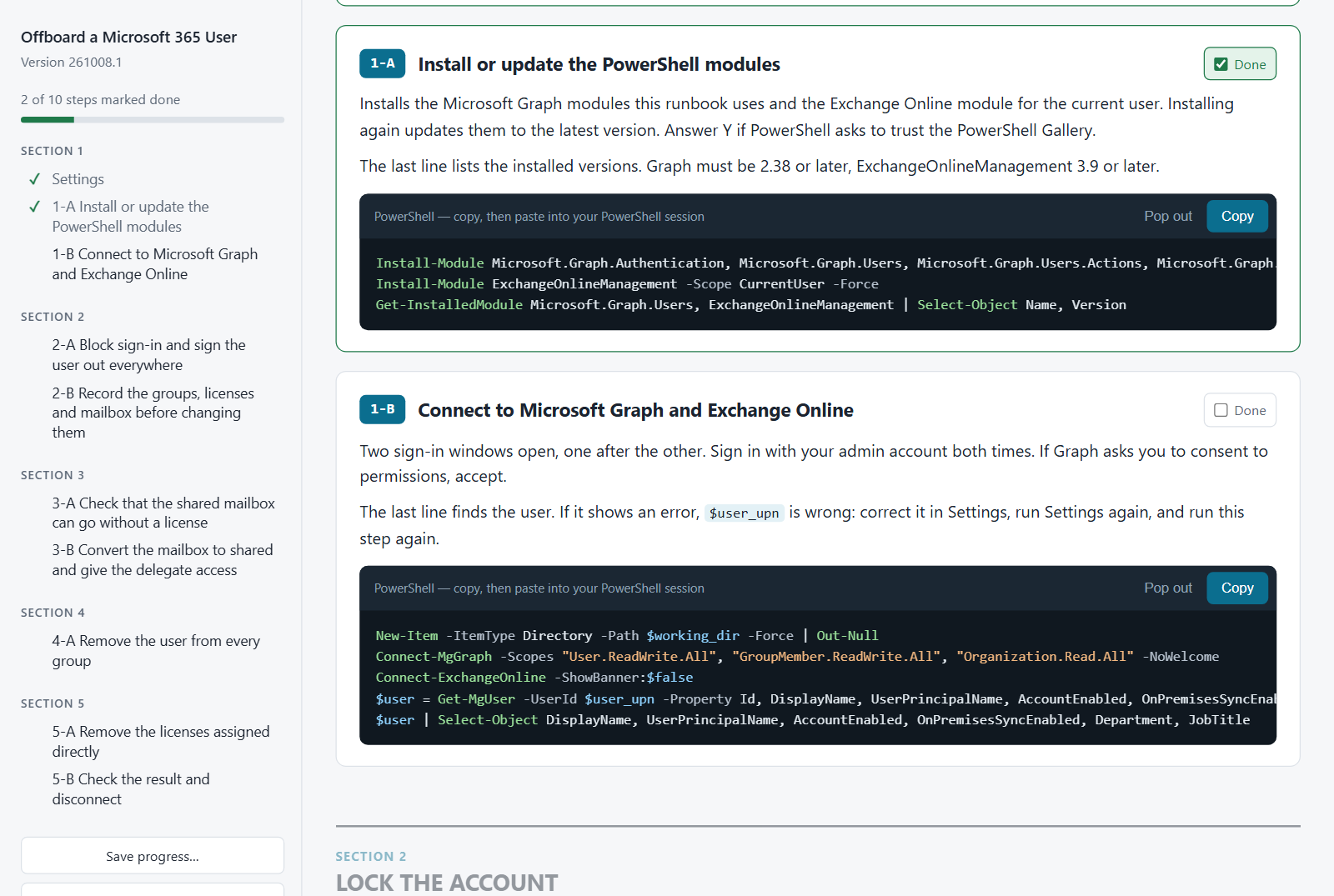
Two steps done. 2-A is waiting on 1-B.
Most runbooks fail at the paste, not the plan.
A procedure can be right and still go wrong, especially one that only gets run once a year. These are the usual places it breaks.
01
Commands get mangled
Wiki pages and word processors swap in curly quotes, wrap long lines and pick up stray characters. Here, Copy takes the code exactly as written.
02
Steps get skipped
Scroll past one block and the rest still look ready. Here, the next step waits for the last.
03
Values get edited in place
Hand-editing a path inside a command is where a quote goes missing. Here, values go into fields, and the runbook writes them into the code.
04
It doesn't travel
The procedure lives on a wiki the contractor can't reach, or in one person's head. Exported, it loses its formatting. Here, it's one file that opens anywhere.
How it works
Write it plain. Build it. Hand over one file.
Write it in a text file
A short header, then the steps: a title, a dashed line, comments that explain it, then the code to paste. It's how you already comment your scripts.
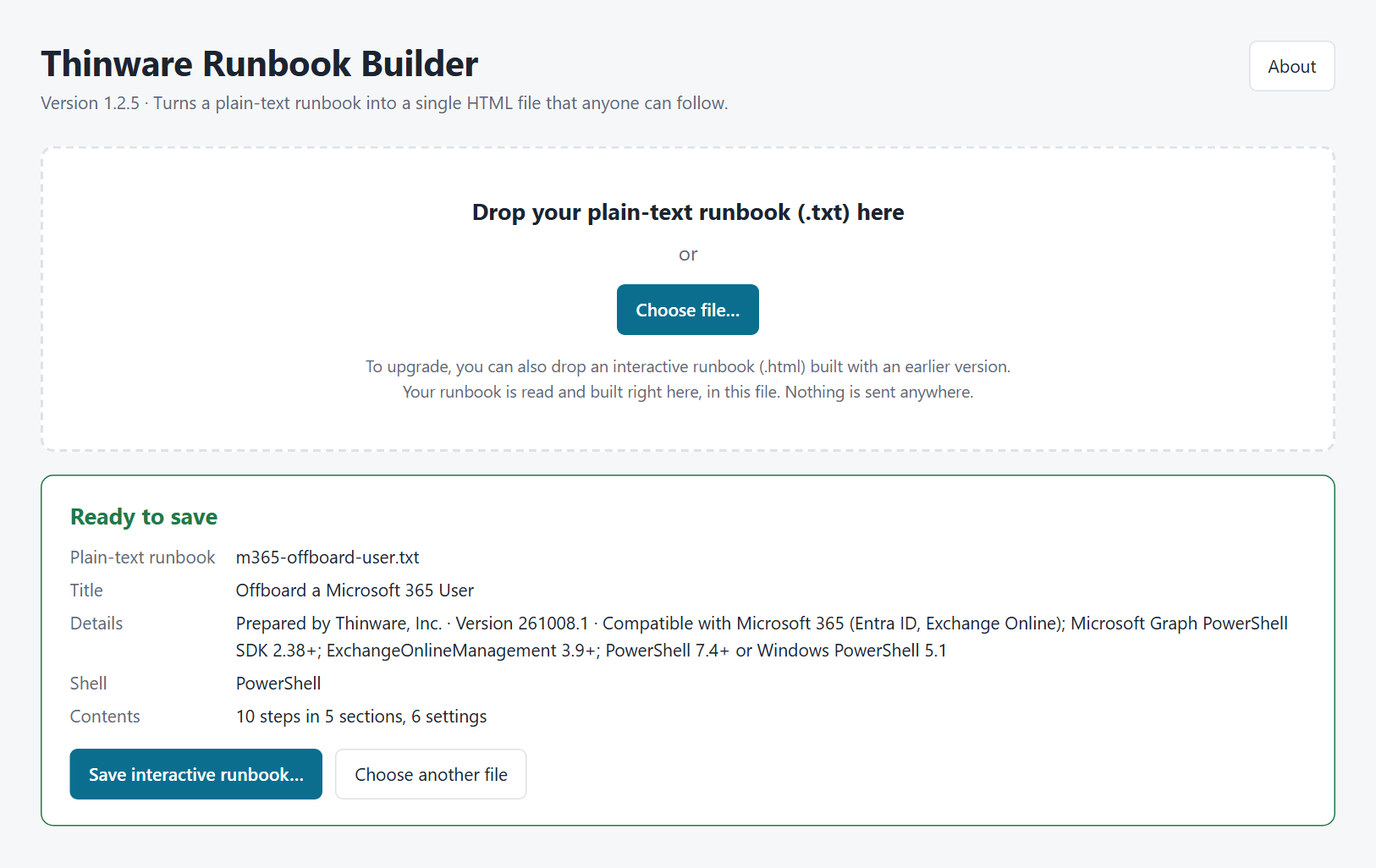
Drop it on the Builder
Open the Builder from your disk and drop the file on it. If something's wrong, it tells you the line and why. If not, you get a preview of the interactive runbook exactly as it will be saved.
Hand it over with its hash
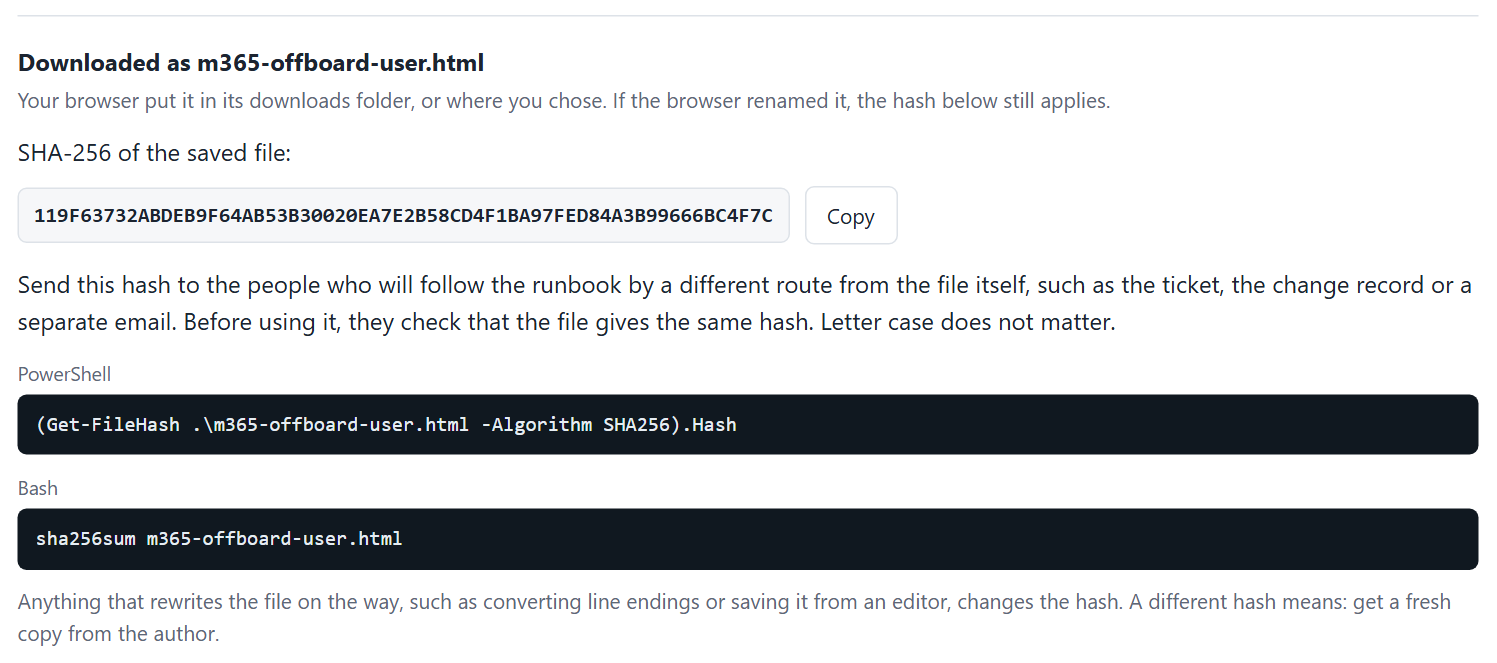
Send the interactive runbook, and its hash separately, so whoever follows it can confirm nobody changed it on the way. They open it in any current browser and work down the steps.
What it's for
Made for the work you do every month. And the procedure you run once a year, at 2 a.m.
Most runbooks aren't for disasters. They're for the jobs that keep coming around, where the steps should be the same every time and so should the result. The same runbook holds up for the disaster recovery, the migration or the failover: the night nobody remembers the steps, nobody can afford to skip one, and the person running it may not be the one who wrote it.
Patching
The monthly cycle for Windows and Linux servers. Snapshot, patch, reboot, check, in the same order every time.
Microsoft 365 management
Onboarding, offboarding, licenses, mailbox and group changes. The PowerShell you'd otherwise rebuild from memory and old tickets.
Server builds
A new server set up the same way as the last one, whoever builds it.
Configuration changes
The change you make on ten machines, or once a quarter, done the same way each time.
Same steps. Same order. Same outcome.
It works alongside your scripts, not instead of them. The runbook puts them in order, explains each one, and leaves a person in control of when they run and what happens next.
Works with your AI tool
Describe the job. Get a runbook.
Give Claude, ChatGPT or Copilot the included Design Guide, which has a section written just for them, and tell it what needs doing. You get back a runbook ready to build: steps in order, settings up front, every command explained.
You stay the expert. It does the typing.
Using this design guide, write a runbook to offboard a Microsoft 365 user.
Features
Strict where it counts. Out of the way everywhere else.
It never runs a command. You do, in your own session, with your own credentials. The runbook just makes sure what you paste is right.
Where it fits
Not an automation platform. On purpose.
Runbook tools mostly fall into three camps: pages on a wiki, notebooks that run code from an editor, and platforms that run jobs from a server. Runbook Builder covers the case they leave out: a person who has to run a procedure correctly, whether it's this month's patching or a client's migration, with nothing installed.
| Thinware Runbook Builder | Wiki pageConfluence, SharePoint, a shared doc | Runnable notebooksuch as Runme | Automation platformsuch as Rundeck, incident tools | |
|---|---|---|---|---|
| Who runs the command | You, in your own session | You, by copying from the page | The editor or CLI runs each block | The server runs jobs on target nodes |
| What you need to run it | A browser | Access to the wiki | VS Code or the CLI installed, and the repo | An account on a server someone runs |
| Steps kept in order | Yes, each step waits for the last | No | Up to the reader | Yes, as a defined workflow |
| Values that change each run | Fields, escaped for the shell or the database | Edited by hand inside the command | Prompts for environment variables | Job options |
| Handing it to a client | Send one file and its hash | Export, and lose formatting | Share a repo and a toolchain | Give them access, or install it there |
| Cost | Free | Part of the wiki license | Open source | Free community editions; paid tiers per user or by quote |
Each of these is the right tool for something. If a job should run unattended on a schedule, use a platform built for that. Use the Builder when a person needs to run it, see the output, and decide what comes next.
Questions
Frequently asked
What's the catch?
None. We ask for your name and email before the download, and that's it: no sign-in, no trial, no nag screen. Build as many runbooks as you want, give them to whoever needs them, and bill your clients for the work. The one thing you can't do is modify or resell the Builder itself. Full terms are on the License page.
What does someone need to open an interactive runbook?
A browser: Chrome, Edge or Firefox (Chrome and Edge 102 or later, Firefox 112 or later), on Windows, macOS or Linux. Safari 16.4 should work but is not tested. No install, no account and no internet connection.
What's actually inside the file?
Plain HTML, CSS and JavaScript, all in one file. Open it in a text editor and read every line. No binaries, no downloads, nothing hidden.
Is my runbook uploaded anywhere when I build it?
No. You download the Builder and open it from your own disk, and it builds the runbook right there in the browser. Its Content-Security-Policy forbids network requests, so it couldn't send anything if it tried.
Does it run commands on my machine?
No. It only copies text to the clipboard. You paste it into a PowerShell, Bash or MySQL session you opened yourself, so nothing runs without you, and the file never holds anyone's credentials.
Does the Builder write the runbook for me?
No, but your AI tool can draft one from the Design Guide that comes with it.
How do I change a runbook after I've sent it?
Edit the plain-text runbook and build again. Any change to the text starts everyone fresh, so bump the version too, so people can see which copy they have.
I lost the plain-text runbook. Can I get it back?
Yes. Drop the interactive runbook on the Builder. It takes the runbook text out, rebuilds it with the current version, and offers Save plain-text runbook.
Where are Done marks and typed values kept?
In your browser, and in a progress file if you save one. Nothing leaves the machine.
Which shells does it support?
PowerShell, pwsh, Bash, sh and zsh, set by a Shell line in the header; or MySQL, set by a Language line instead, with settings written as SET statements and the code colored for MySQL. The shell or language decides the coloring, the line endings and how typed values are escaped.
Can I put passwords in the settings?
No. Keep secrets out of runbooks entirely and have the step prompt for them when they're needed. The documentation shows how.
How do I verify the download?
The download screen shows the zip's SHA-256 hash. Check it with:
The README inside the zip gives the hash of runbook-builder.html itself, for checking a copy later.
Can I add my logo?
No. Put your company in the "Prepared by" line; it's shown under the title.
Build your next runbook with it.
We built it after watching too many good procedures go wrong over a bad paste or a step run out of order. It's the tool we wanted, so it's free.
We're the team behind vBackup, vOpsCentral, SimpleNAS and SimpleVM, and we're partnered with Dell, Microsoft, Adobe, ESET and others for the hardware and software to run them on. The rest of what we do is at thinware.net.